Cloud Cost Allocation Guide
Summary: Allocation is a core process that uses hierarchies, tags, and labels to accurately assign technology costs to specific owners, departments, or projects for showback and chargeback purposes. It’s critical for FinOps practitioners to collaboratively define and implement a metadata strategy, including required tags like ‘Cost Center’ and ‘Environment’, and enforce it across the organization, noting that tags cannot be applied retroactively. Practitioners should also focus on key metrics to measure the maturity of their Allocation practice, such as increasing the percentage of costs that are tag compliant and reducing the time between when a cost is incurred and when it is displayed to the end team.
Abstract
Cloud computing generates enormous amounts of billing data as resources are continuously spun up and spun down. All this billing data must be accurately accounted for across a number of financial and operational dimensions of an organization.
This paper is designed to expand on the FinOps cost allocation capability by providing insight into cost allocation strategies and related stakeholders.
Definition
Detailed cloud billing and usage data, when aggregated, produces thousands to millions of lines of data making it challenging to appropriately divide cost among the parts of an organization who are responsible for it. Cost Allocation is a process of identifying, categorizing, and assigning the costs of cloud computing resources to specific users, departments, projects, or any other relevant grouping within an organization through the use of structural hierarchies, tags, and labels available from cloud service providers or third party tooling platforms.
FinOps practitioners most often apply a cost allocation strategy for the purpose of chargeback and or showback. However, the structural hierarchies, tags and labels used for cost allocation can also be leveraged for other organizational and reporting purposes. Properly designed and implemented strategies for cost allocation will result in a more detailed and accurate chargeback, showback, and reporting functions.
Before you continue reading, we would like to inform you of our use of the term tag throughout this document. A tag is a key-value pair that is a keyword or term assigned to a resource or hierarchy structure used to describe a piece of metadata. Generally tags are assigned to resources in order to assign ownership, describe a resource, and ultimately allocate costs for the purpose of financial accounting. Not all CSPs use the same term of “tag” to describe this feature but for the purposes of this document we will use tag(s) as a means in reference to all like offerings provided by CSPs.
Benefits
How you choose to implement cost allocation will impact the benefits you realize as a result of cost allocation. Below are some of the direct benefits an organization can realize by implementing cloud cost allocation.
- Financial Transparency: Cost allocation helps to provide transparency into cloud usage costs by understanding which costs relate to which projects, departments, environments, etc.
- Accountability: Cost allocation increases accountability by clearly attributing costs to responsible owners.
- Chargeback/showback: Cost allocation can enable organizations to implement chargeback models, where departments or projects are charged/shown their specific cloud resources they consume, promoting greater cost awareness and financial responsibility.
- Cost Optimization: By tracking and allocating costs to specific users, departments, or projects, organizations can identify areas where they can optimize their spending.
Cost allocation also generates strong downstream benefits with other FinOps Framework Capabilities. See Intersects with other frameworks section.
Strategies
Dividing up a cloud service provider invoice or bill can be challenging due to the volume of records present in detailed billing data and the various lenses through which your organization may wish to divide up costs. Navigating cost allocation without a defined strategy will prove difficult to achieve cost allocation goals.
Once approaches for hierarchy structure and tagging/labeling are well defined, properly implemented and maintained organizations can realize the full benefits of cost allocation. There are a wide variety of cost allocation strategies and implementation paths.
Hierarchies
Cloud service providers offer ways to organize resources into hierarchies. These hierarchical structures allow end users to name and organize resources in meaningful ways to allow for understanding of contents and related billing data. The below image compares the hierarchy structures across AWS, Azure, and GCP.
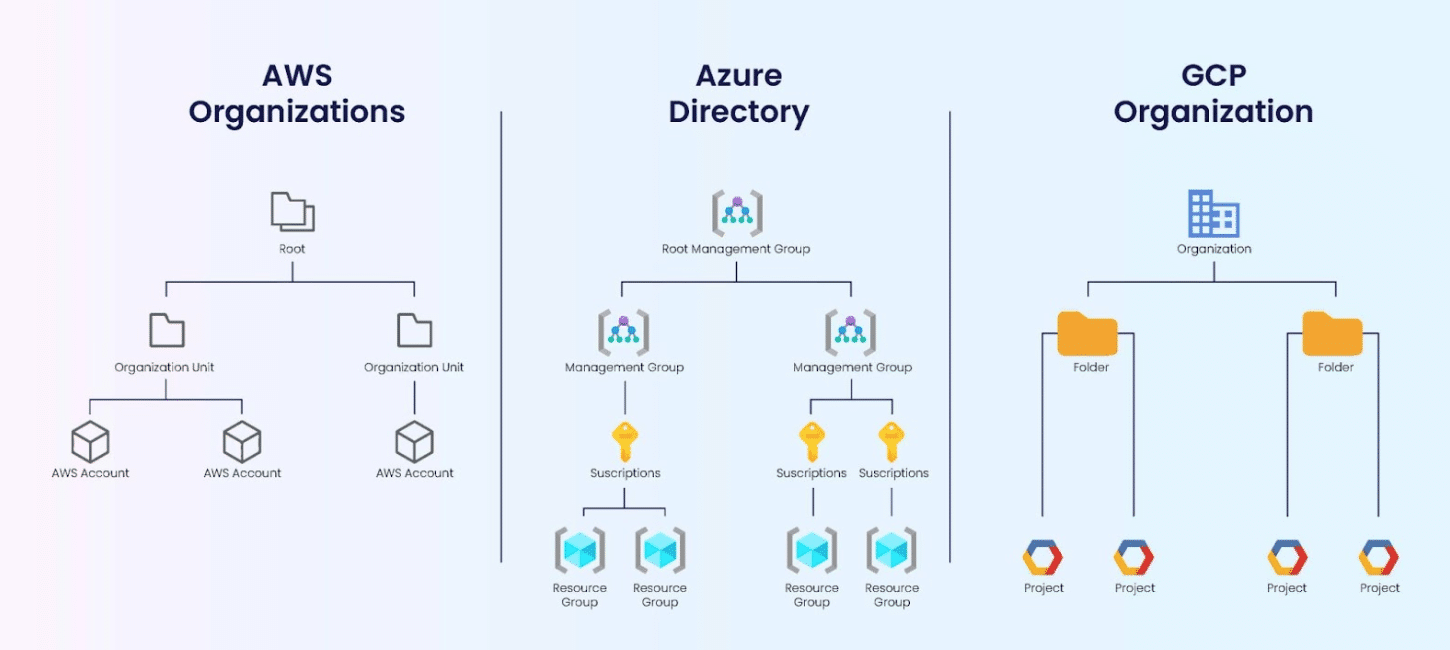
From AWS, Azure, and GCP: The Ultimate IAM Comparison (zippyops.com)
While these hierarchies look different, some of these elements are directly comparable.
AWS organizations are the structural hierarchies offering a directory of accounts. Tagging is available at different levels of the directory such that the accounts and resources within the level will assume the tags of the level they belong to and their parent level(s).
Azure allows end users to create resource groups to organize and tag resources. Assigning tags at a resource group level also benefits taggable and untaggable resources within.
GCP offers folders as part of the resource hierarchy to organize projects. GCP Tags can be created at the organization level and inherited by child resources. GCP Labels is an additional way of collecting metadata for resources. Unlike Tags, Labels are applied at the resource level and are not inherited by child resources.
See the Hierarchies section in the appendix for information specific to various cloud service providers.
Tagging & Labeling
All of the cloud service providers also allow for the use of tags which can be applied as metadata to most individual resources, and which then appear in the detailed billing reports providing cost and usage data when turned on by the user. See appendix under cloud service provider guidance
All CSPs have tools which allow users to organize tags, arrange hierarchy groupings, and apply metadata appropriately. The naming standards used for the accounts, resource groups, projects, and folders, can also be useful in determining the owner of any group of resources.
The tagging strategy and categories for which one tags resources go hand in hand. The strategy defines the standardization of tags, which tags are required, and why they are beneficial (drive accountability, showback, chargeback, metrics, visibility, monitoring).
The following tag categories are some examples of tags commonly used in cost allocation for chargeback or showback.
| Tag | Description | Example Value |
|
Business Tags |
||
| Name | Name of the application | ABCapplication |
| Environment | Defines the environment | production |
| Cost Center | Identifies the cost center associated with a resource | CC12345 |
| Business Owner | Identifies who is accountable for the resource | Businessowner@myorg.com |
|
Security Tags |
||
| Compliance | Identifies the level of compliance requirements (HIPAA, PCI, GDPR, etc.) | HIPAA, PCI, GDPR |
| Encryption | Identifies if a resource is encrypted or not | Yes/No |
|
Automation Tags |
||
| Date/Time | Identifies when a resource was started, stopped, rotated, terminated, etc | 08/05/2003 03:05:15 PM |
| Opt In | Indicates whether a resource should be automatically included in an automated activity (e.g. resizing, deletion, etc.) | Yes/No |
While the above examples are commonly used for cost allocation and reporting, there are many other useful tags which organizations use for other purposes, such as resource management, change management, scheduling/automation, security compliance and more. When creating a cost allocation tag strategy, be sure to consider all stakeholders’ needs.
The assignment of tags is important in one’s organization and processes. Generally it is best to assign tags as close to the resource and source data as possible, meaning to apply them directly within the cloud service provider’s ecosystem so that the tags flow with cost and usage data to any downstream systems however this may not be ideal for some organizations.
It is important to note that some CSPs have specific cost tags which need to be enabled for them to appear in a tool or the usage and billing data. If those tags are not enabled, they will not show up in those reports. Additionally, tags cannot be used retroactively.
To expand, if a resource is tagged on the last day of the month with “Production”, it will only appear in reports moving forward. If a report for the last 30 days is run, the resource will be untagged for every day except the last day in the report.
Some organizations may choose to assign tagging metadata for cost allocation within their CMDB (Configuration Management Databases) systems and link subscriptions, accounts, resource groups, etc. to this metadata.
An important prerequisite to effective cost allocation is the metadata (data about data) strategy, which must include details to guide and govern the cost allocation process as well as how the costs will be shown to various stakeholders. The strategy should contain categories of tags/labels, description of the tag and why it is beneficial, example tag values (e.g. business unit, P&L group, cost center, application, service, product, etc), and whether the tag is required from compliance, regulatory, or other means.
Other tags can be added but having a balance between too few and too many tags can be challenging. Yet it is expected that there will be multiple layers of tags driving cost allocation data and analysis. It is strongly recommended that the strategy be defined and agreed on by all stakeholders before resources are tagged so that the tags can be standardized and enforcement can be implemented from the beginning.
Tags can ultimately provide clear guidance for cost allocation purposes and to different personas. Building a cost allocation strategy requires input and understanding from multiple personas- most notably engineering, finance, and executives. Having a strong understanding of each of these stakeholders enables one to be successful in their cost allocation strategy and implementation. For example, finance may need to see costs aggregated by cost center, yet engineering teams benefit from a more granular breakdown by service, application, resource type, or environment and everyone can benefit from unit economics data.
Other organizations may choose to leverage 3rd party cost allocation systems for cost allocation as the 3rd party system may provide more capabilities and value than the cloud service provider tools do
Ultimately, an organization’s tagging strategy, implementation, and enforcement will determine its viability as an accurate cost allocation method. Having a tagging strategy that is only partially implemented or enforced will lead to incomplete and incorrect data which will lead to mistrust of the costs.
See the Assignment section in the appendix for specific guidance by cloud service providers.
Shared Costs
The CSP provided structures for cost allocation aid organizations in appropriately dividing cost among the parts of an organization who are responsible for it. This is easy when the costs for a particular application, service, etc. belongs to a single owner. Dedicated costs are present where resources (incurring cost) have an ownership ratio of 1:1. However, some cloud charges cannot be assigned to a singular business unit, application, cost center, etc. but are rather shared across multiple business units, applications or cost centers.
These are called shared costs. Sometimes shared costs are supported by cost allocation structures such as tagging and sometimes they are not. Appropriately dividing costs among the parts of an organization who are responsible for it is more challenging in the shared cost scenario.
For more information on shared costs see A Guide to Spreading Out Shared Cloud Costs (finops.org)
Compliance and Enforcement
Defining and implementing strategies for hierarchies and tagging is essential to cost allocation success. However, maintaining proper implementation can be challenging. As with the phases of defining and implementing, it requires the involvement of many people to maintain the strategic approaches. The CSPs offer guidance on ensuring compliance and enforcement to the tagging policies set forth by you and your organization. Visit the Compliance and Enforcement section in the appendix for specific guidance by cloud service providers. Continue reading for guidance on KPI metrics relevant to cost allocation compliance.
After all other strategies are defined, practitioners must understand how to ensure that tags are compliant and enforcement of the strategies are occurring. Ensuring compliance and enforcement requires diving deeper into the capabilities provided by the cloud service providers. A FinOps practitioner needs to understand these capabilities and be able to identify and address resources which are not tagged. Having a strong FinOps culture is key toward having tags applied successfully across one’s organization as there is only so much technology can do fostering a FinOps culture can achieve more results..
Here are recommended guidelines:
- Identify all resources generating costs that can be tagged that are not tagged, define the impact of these resources remaining untagged.
- Identify all tags that are not compliant with defined categories and values, define the impact of these resources being out of compliance.
- Educate engineers on the importance of tagging new and existing resources.
- Work with engineers to apply tagging to current resources to resolve existing gaps.
- Apply peer pressure by showing dashboards and reports on tagging compliance to all personas to trigger questions and gain momentum.
- Explore enabling tagging enforcement via cloud service provider capabilities (e.g. AWS can enforce tagging on resources through service control policies)
- Explore identifying out of compliance tags via cloud service provider capabilities.
With all of the above, it is a best practice to focus on reviewing and revising tags for the most costly resources and look to balance the effort to correct versus the quantity of cost values corrected.
Who is Responsible for Cost Allocation?
The short answer to this question is that everyone who is involved in the use or monitoring of cloud resources is responsible for Cost Allocation.
Finance
The natural thought is likely that finance is responsible for cost allocation. Accurate reporting and tracking of revenue and expense is one of the core activities of the finance function. Finance is ultimately responsible for getting the correct expense to the correct cost center / line of business for accurate profitability measurement. Without being able to accurately report (and predict) the profitability of a product line or line of business, organizations will not be able to appropriately decide on a number of related topics, such as pricing decisions, when and how much to invest in product enhancements and features, or ultimately when to exit.
Therefore, when viewing the question using a RACI framework, it is probably reasonable to conclude finance is definitely a responsible party for ensuring cost allocation is done in an accurate and timely manner.
Engineering
Finance is not the only responsible party, in order to accurately allocate costs across an enterprise. In order for finance to be able to allocate costs, they need to leverage numerous attributes such as hierarchy, account, cost center or metadata such as application ID tagging.
As the sourcing of cloud services is generally done in a decentralized manner with individual decisions being made by engineers and developers they are on the front-line when it comes to ensuring accurate attribution. As such, engineers and developers are key functions to ensure accurate cost allocation. They also may be responsible for developing the report or running reports to send to finance depending on your organization’s role-based access. In a simple scenario, if a service is tagged to an application id, finance can at least allocate those costs to the line of business which owns that application.
It is important to note that this will not be available or clear from an invoice or bill. Bills only account for high level roll-ups which often leave finance in the dark about how the cloud is being used and where the costs are going and can create mistrust or misunderstandings on what an organization is spending if finance does not have additional insight. If referring back to the RACI framework, it seems reasonable to state that engineering / development can be viewed as accountable and / or consulted.
They are at least consulted when it comes to applying the correct metadata, if not accountable as the initiators of the resource usage with direct understanding of how they will be deployed.
Business/Product
A close user and influencer of cost allocation are those in a business/product role. Those in this role generally have costs which are both direct to their product or business area while also receivers (if not also owners) of indirect, or shared costs. Products or product areas are generally created as the items have some innate interoperability or interconnectedness between them. This makes the product owner instrumental in providing the correct metadata, or allocation taxonomy, to ensure the costs are distributed in the most effective manner.
A product owner is also interested in any shared cost allocation for which they have no direct influence as well. They need to understand the methodology and driver of the cost being allocated to their product in order to inform product development decision making. As the business / product role is generally a receiver of information (reporting, operational data, etc.) which is driven by the cost allocation processes, you would infer they fall into the Informed category within the RACI model.
However, as they generally represent the layer between engineering / development and executive, their place in the hierarchy moves them up the scale to the accountable role. They would be one of the first to spot issues or inaccuracies and be in a good position to influence changes across a broad array of resources when necessary.
Executives
Never to be excluded from the conversation is the executive role, and as stated above they are generally aligned to the business / product role, having one or multiple which report into them. They are ultimately responsible for the sign off on the allocations to their business unit, therefore they have to be involved in developing them as well so they are sure to understand and be accountable for the results.
The design of the cost allocation strategy comes through working closely with the business, product, and engineering/developer roles in product design to understand the key drivers of ‘transactions’ for the application and how they might impact resource usage. Developing a robust cost allocation methodology may not be achievable to the desired scale / result without bringing supporting applications (i.e. 3rd party cloud management tools).
The decision and level of investment associated with such needs would be decided at the executive level. Ultimately, the executive is accountable for the profitability of the business unit(s) they oversee and therefore needs a deep understanding of the technology supporting it.
Intersects with other FinOps Framework Capabilities
Anomaly Management
The greater financial transparency and accountability achieved through strategic tagging can enable a better understanding of anomalous spend. When delivered alongside anomaly alerts the detailed information provided by tags can help practitioners to make sense of anomalous events and provide guidance on how to, where to, or whom to involve in the investigation of the cost increase.
Budgeting & Forecasting
Forecasting & budget management are separate nuanced capabilities within the FinOps Framework. These capabilities can benefit, if not inform, the cost allocation strategy and process promoting more granular and accurate decision making. For example, cost allocation structures for chargeback should align with the structures in place for forecasting and budgeting of cloud spend. The forecast might already be separating costs out by business unit, application, or other units which the cost allocation would also need to apply to.
Of course, if the forecast is a high-level roll-up, this might not be the case. Similarly, any cost allocation implementation will want to take into consideration current and future forecasting capabilities and needs.
Understanding how and why the forecast is set up can be beneficial in designing or making changes to a cost allocation model. It can also highlight what data is already available to an organization. A forecast typically relies on, at least in part, historical spend. And as a cost allocation model is being determined, that same data may be needed for forecasting.
While cost allocation is focused on taking the actual spend and distributing it across the responsible units, a forecast may want to then take that model and project it forward. While it may not be necessary in every organization to have these two operations in sync, they will both benefit from the shared processes.
Other benefits
The financial transparency and cost optimization achieved through cost allocation opens the door to proving cloud-native as the best solution to reduce costs and increase efficiencies further promoting the use of cloud native technologies.
Comparing On-Premise, Datacenter, Private to Cloud Cost Allocations
When organizations initially move from on-premises infrastructure services to the cloud, there may be questions in relation to cost allocation strategies that are leveraged by the recipients of those services.
For instance, a virtual machine from a cloud provider can be billed hourly, whereas an internal virtual machine might be billed based on CPU and memory consumption.
For comparability, organizations may want to compare existing infrastructure services with cloud services. The easiest way to do this is to compare services using the same unit of measure so that they can easily compare unit costs. Additionally, ensuring both the on-premise teams and cloud teams are speaking and reporting in the same terminology and reference is critical for cost comparison.
Compute Units are the processing units of a machine primarily Cores and Memory. By allocating based on Compute Units an organization can start to identify whether they need to switch to a different class of machine based on the usage of cores and memory.
For the majority of Cloud Services classified as compute-optimized, the primary driver for increases in unit costs is driven by the number of cores. Where cloud services are classified as memory-optimized, the primary unit price driver remains cores but with a higher weighting on the memory.
This cost allocation methodology can be applied to any cloud service that relies on Servers for hosting and therefore can cover both Virtual Machines, Databases and Container orchestration tools.
For on-premises infrastructure services, there will be an additional charge for space and licensing that will be factored into the compute unit calculation. This will mean that for a machine that has the same cores and memory, the cost of the machine might be slightly higher in an on-premises environment compared to a cloud environment.
Be sure to understand what goes into comparing an on-premises environment to a cloud environment as there may be additional cloud services outside of the compared compute which should also be incorporated for an “Apples-to-Apples” comparison.
By using a similar unit of computing for cost allocation purposes, organizations will be able to drive adoption for cloud services that would benefit from the cloud’s economies of scale. Recipients of cloud services will also be able to easily determine the return on investment for their business units because of moving to the cloud.
Example:
| Type | Cores | Memory | Space | Unit of Compute | Cost |
| Server On-Premise | 4 | 32GB | 1 | 9 | 1,520.00 |
| Virtual Server – On-Premise | 4 | 32GB | 0.06 | 5 | 844.00 |
| Virtual Machine – Cloud | 4 | 32GB | 0.0042 | 2 | 336.00 |
| Total | 16 | 2,700.00 |
Metrics
Like anything else that is being implemented, a cost allocation strategy can also be measured for its success. Below are some of the standard KPIs associated with cloud cost allocation. These metrics can be used to measure your organization’s maturity as well as build trust in the data that is being reported.
| KPIs | Level 0 | Level 1 | Level 2 | Level 3 | Level 4 |
| % of costs taggable / untaggable | <30% | 31 – 79% | 80 – 85% | 86 – 90% | >90% |
| % of costs allocated / unallocated | <30% | 31 – 79% | 80 – 85% | 86 – 90% | >90% |
| % of cost that is tag compliant | <10% | 10 – 20% | 21 – 50% | 51 – 80% | >80% |
| Accuracy of costs allocated (# of tag value revisions or % spend unable to be allocated due to improper tag values) | 15+ questions or revisions | 7 – 15 questions or revisions | 4 – 7 questions or revisions | 1 – 3 questions or revisions | 0 – 1 questions or revisions |
| Transparency of cost allocation (# of questions received on cost allocation) | 15+ questions | 7 – 15 questions | 4 – 7 questions | 1 – 3 questions | 0 – 1 questions |
| Transparency of cost allocation (Hours between cost incurred and cost displayed to end team) | > 30 days | 10 – 29 days | 5 – 9 days | 1 – 4 days | <1 day |
| Driving adoption (% of costs allocated by teams, business units, creators) | <30% | 31 – 79% | 80 – 85% | 86 – 90% | >90% |
These are only a few cost allocation metrics and each organization may develop their own which is appropriate to implement for their goals and maturity.
Organizations that progress higher in the maturity model above are able to realize few or all of the benefits listed above – financial transparency, accountability, chargeback/showback abilities, and overall cost-optimization. Such maturity that’s driven by cost awareness and measurements should lead to better spending control and cross-team accountability. Advancing maturity levels in metrics like cost allocation transparency from 30 days to hours requires time, resources, and tools throughout the organization.
Conclusion
The guidance throughout this documentation should hopefully give any new FinOps practitioner or experienced person wanting to refresh their knowledge enough information to define cost allocation, its benefits, known strategies, and how other FinOps roles can be responsible for outputs and processes of this capability. It’s a core FinOps Framework capability to understand, and our community will continue to build upon this foundational work so that practitioners of any company, organization, or enterprise can begin building a lasting, valuable FinOps practice.
If you would like to get involved, we offer a number of options including:
- Discussing and asking questions about cost allocation on our Slack channel
- Getting in touch to join our Working Group to help us continue improving and building out this content during future sprints
Acknowledgements
The FinOps Foundation would like to thank the following Working Group members for building this documentation and knowledge to share with our greater community.




Thank our supporters and interviewees
We’d also like to thank our TAC Liaison, William Bryant of Apple, and the following supporters of this output:
- Dmitry Gomel
- Mike Ebels
- David Leiyian Motongo
- Brian Robbins
Lastly, a big thank you to the FinOps Foundation support team for helping us bring our work to life: Ashley Hromatko (Staff Sponsor), Samantha White (Program Management), Tom Sharpe (Design), and Andrew Nhem (Content).
Appendix
Each cloud provider has documentation on how to implement tagging/labeling within its environment, linked below:
General
AWS
- Introduction – Organizing Your AWS Environment Using Multiple Accounts (amazon.com)
- Best Practices for Organizational Units with AWS Organizations | AWS Cloud Operations & Migrations Blog (amazon.com)
- AWS Account Structure Considerations – Laying the Foundation: Setting Up Your Environment for Cost Optimization (amazon.com)
- Using AWS cost allocation tags – AWS Billing (amazon.com)
- (Example) Defining an AWS multi-account strategy for a digital bank
- (Example) Defining an AWS Multi-Account Strategy for telecommunications companies
Azure
- Group and allocate costs using tag inheritance – Microsoft Cost Management | Microsoft Learn
- Resource naming and tagging decision guide – Cloud Adoption Framework | Microsoft Learn
- Define your tagging strategy – Cloud Adoption Framework | Microsoft Learn
GCP
- Creating and managing labels | Resource Manager Documentation | Google Cloud
- Creating and managing tags | Resource Manager Documentation | Google Cloud
Hierarchies
AWS
Azure
GCP
Compliance and Enforcement
AWS
Azure
- Policy definitions for tagging resources – Azure Resource Manager | Microsoft Learn
- Tutorial: Manage tag governance – Azure Policy | Microsoft Learn